Why “One Dialer, One Mode” Is Dying: The Case for Multi-Modal Dialing Platforms
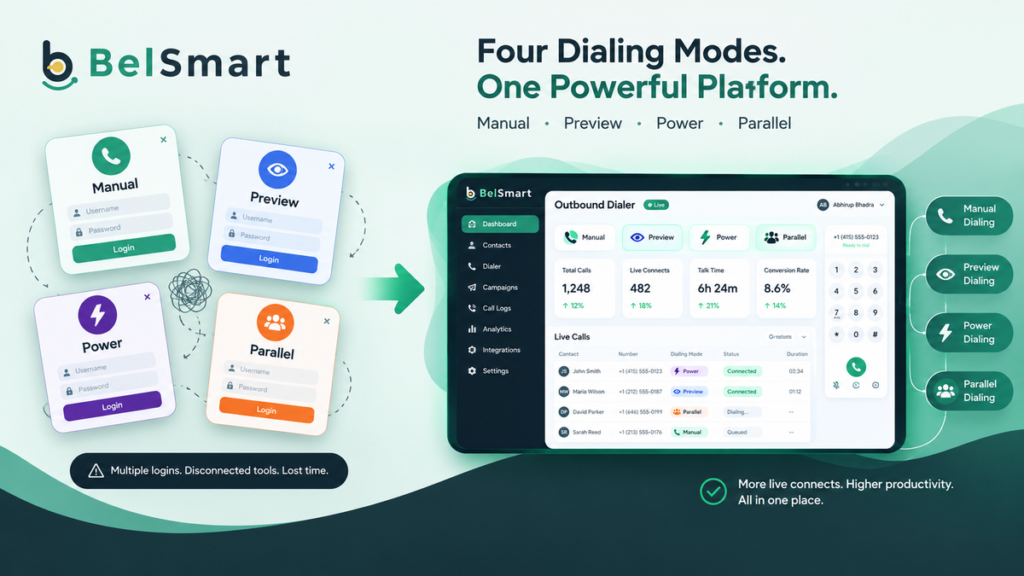
A multi-modal dialing platform is outbound calling software that runs manual, preview, power, and parallel dialing from a single system, so a team can match dialing speed to lead quality without switching tools. Most dialers on the market still specialize in exactly one mode, and that single-mode design is becoming the biggest hidden bottleneck in outbound sales operations.
For years, buying a dialer meant picking a lane. A team bought a power dialer for volume, a parallel dialer for speed, or a preview dialer for high-touch enterprise selling, and built its process around whatever that one tool could do. That approach made sense when outbound teams ran one type of campaign at a time. It stops making sense the moment a team runs more than one.

What Is a Multi-Modal Dialing Platform?
A multi-modal dialing platform is a single piece of software that supports several distinct dialing methods — typically manual (click-to-call), preview (agent reviews the lead first), power (one call per agent, auto-advancing), and parallel (multiple simultaneous lines per agent) — under one login, one CRM sync, and one compliance layer.
The distinction matters because most vendors in the outbound dialer category build around a single dialing philosophy. A scan of the current market shows this pattern clearly: parallel-dialer specialists optimize for raw connect volume, power-dialer tools optimize for steady one-to-one pacing, and preview-first platforms optimize for context-heavy enterprise calls. Each is genuinely good at its one job. None of them is built to be good at all four.
Takeaway: most dialer vendors sell one dialing philosophy, not four — a true multi-modal platform is the exception, not the norm.
Why Do Single-Mode Dialers Create Operational Debt?
Single-mode dialers create operational debt because a team running more than one campaign type ends up licensing, integrating, and maintaining compliance separately for each dialer, and that overhead multiplies with every additional tool added to the stack.
Consider a typical mid-market outbound team. The SDR team cold-calling a purchased list needs volume, so they want power or parallel dialing. The same company’s enterprise closers, working a short list of six-figure accounts, need preview dialing with full account context before every call — dialing fast here actually hurts conversion. A support or renewals team may only need manual, click-to-call dialing with no automation at all.
With a single-mode dialer, that company now needs three separate tools, three separate logins, three separate CRM integrations, and three separate compliance configurations. Each new tool adds:
- A new vendor contract and renewal cycle to manage
- A separate CRM sync that can silently drift out of alignment with the others
- A duplicate compliance setup — DNC scrubbing, consent tracking, calling-window rules — maintained two or three times over
- Fragmented reporting, since call outcomes live in different systems and rarely roll up into one view
- Onboarding friction, because agents who move between teams have to relearn a different interface
None of these costs show up on a single vendor invoice. They show up in slower onboarding, inconsistent compliance audits, and a reporting stack nobody fully trusts.
Takeaway: the real cost of “one dialer, one mode” isn’t the software price — it’s the operational tax of running several of them side by side.
Can One Dialer Really Handle Every Campaign Type?
Yes, but only if the platform was architected for multiple dialing modes from the start, rather than adding a second mode as a bolt-on feature later. The difference shows up in whether CRM sync, compliance rules, and reporting are unified across modes or duplicated per mode.
This is the practical test worth applying to any vendor claiming multi-mode support: ask whether switching a campaign from power to preview dialing requires a new integration, a new compliance setup, or a new login. If the answer is yes to any of those, it’s not a true multi-modal platform — it’s two products wearing one brand name.
Takeaway: the real test of multi-modal support isn’t whether a vendor offers more than one mode — it’s whether switching modes ever forces a new login, integration, or compliance setup.
How Does Multi-Modal Dialing Compare to Running Separate Tools?
The table below breaks down the operational difference between running a stack of single-mode dialers and running one multi-modal dialing platform across the same requirements.
| Task / Requirement | Single-Mode Dialer Stack (3 tools) | Multi-Modal Dialing Platform |
|---|---|---|
| Switching a campaign’s dialing mode | Requires exporting/importing leads into a different tool | Change the mode on the existing campaign, same platform |
| CRM integration | Set up and maintained separately per tool | One integration covers every dialing mode |
| Compliance (DNC, consent, calling windows) | Configured and audited per tool | Configured once, enforced consistently across modes |
| Agent training | Different interface per tool, per team | One interface, all modes |
| Reporting | Fragmented across systems, manual reconciliation | Unified reporting across all campaign types |
| Vendor management | Multiple contracts, renewals, support lines | One vendor relationship |
| Cost predictability | Sum of several point-tool subscriptions | Per-agent pricing on one platform |
The pattern across every row is the same: single-mode stacks multiply administrative overhead with every tool added, while a genuine multi-modal platform keeps that overhead flat regardless of how many dialing modes a campaign needs.
Takeaway: fragmentation cost scales with the number of tools in a stack — consolidation onto one platform is what keeps that cost flat as campaigns grow.
When Do You Actually Need Multi-Modal Dialing? A Decision Framework
Not every team needs all four modes on day one. Use this framework to check whether fragmentation is already a live problem for your operation.
- Count your active campaign types. If you’re running more than one kind of outbound motion — high-volume prospecting and high-touch enterprise outreach, for example — you already have a multi-mode requirement, whether or not your tools reflect it.
- Check your compliance setup for duplication. If your team has configured DNC scrubbing, consent tracking, or calling-window rules more than once across different tools, that’s redundant compliance risk, not just redundant work.
- Look at where leads get stuck between systems. If a lead has to be manually moved from one dialer to another as it moves down the funnel, that hand-off point is a silent leak in your pipeline.
- Audit your reporting for gaps. If leadership can’t see connect rate, talk time, and disposition data across all outbound activity in one dashboard, your point-tool stack is already costing you visibility.
- Ask whether a new hire needs to learn more than one interface. Every additional tool in the stack is additional onboarding time that has nothing to do with actually selling.
See What Running Every Dialing Mode on One Platform Actually Looks Like
Compare Belsmart’s unified CRM sync, compliance layer, and reporting against your current dialer stack.
Where Belsmart Fits
Belsmart was built as a multi-modal dialing platform from the ground up, not assembled by bolting a second dialing mode onto a single-purpose tool. It runs Manual, Preview, Power, and Parallel dialing on one platform, with one CRM sync, one compliance layer, and one reporting dashboard behind all four.
That architecture means a sales leader can run high-volume parallel dialing for a prospecting team and preview dialing for an enterprise closing team, inside the same account, without standing up a second vendor relationship or a second compliance configuration. TCPA and GDPR compliance — DNC scrubbing, consent tracking, and calling-window enforcement — apply consistently no matter which dialing mode a given campaign uses, because it’s one compliance engine, not three.
For a full breakdown of how each individual dialing mode works and where it performs best, see the Power Dialer vs. Parallel Dialer vs. Predictive Dialer comparison or the Ultimate Guide to Outbound Dialer Software. Booked and dialed activity also syncs directly through CRM integration, so a lead moving from a parallel-dial prospecting stage to a preview-dial closing stage never sits unsynced between systems.
Takeaway: a platform built as multi-modal from the start keeps compliance, CRM sync, and reporting unified across every dialing mode — a bolt-on second mode rarely does.
Bringing It Together
The outbound dialer market largely still forces a choice between dialing modes. A multi-modal platform removes that choice, letting the campaign — not the tool — determine which dialing mode gets used, without adding a new vendor, login, or compliance gap every time a team’s needs change.
Teams evaluating a dialer stack should count their active campaign types and audit their compliance setup for duplication before assuming a single-mode tool is enough — the fragmentation cost is often invisible until someone tries to run two campaign types at once.
Frequently Asked Questions
What is a multi-modal dialing platform?
A multi-modal dialing platform is outbound calling software that supports several dialing methods — manual, preview, power, and parallel — within one system. It uses a single CRM integration and compliance configuration across all modes, unlike single-purpose dialers that specialize in only one dialing approach.
Is a multi-modal dialer more expensive than a single-mode dialer?
Not typically. A single multi-modal platform usually costs less in total than licensing separate power, preview, and parallel dialing tools individually, since it eliminates duplicate subscriptions, redundant CRM integrations, and repeated compliance setup across multiple vendors.
Can I switch a campaign’s dialing mode without changing software?
On a true multi-modal platform, yes. The dialing mode is a setting on the campaign, not a separate product. If switching modes requires a new login, export, or integration, the platform isn’t genuinely multi-modal — it’s two tools under one brand.
Does compliance get harder with multiple dialing modes?
It shouldn’t, on a properly built multi-modal platform. DNC scrubbing, consent tracking, and calling-window rules should apply once across every dialing mode. Compliance only gets harder when multiple single-mode tools each require their own separate configuration and audit trail.
Which teams actually need more than one dialing mode?
Any organization running more than one type of outbound motion at once — for example, high-volume prospecting alongside high-touch enterprise outreach, or a BPO managing multiple client campaigns with different requirements — typically needs at least two dialing modes to match effort to lead value.
How is this different from just buying separate dialer add-ons?
Add-on dialing modes bolted onto a single-purpose tool usually still run on separate backend logic, which means compliance, reporting, and CRM sync can diverge between modes even under one brand. A platform built as multi-modal from the start keeps that logic unified.
Run Every Dialing Mode From One Account
Book a personalised demo of Belsmart’s Manual, Preview, Power, and Parallel dialing — with unified CRM sync, compliance, and reporting — and get a custom plan recommendation in under 30 minutes.
Questions about pricing? sales@belsmart.io · We reply within one business day.