Cost Per Acquisition in Outbound Sales: The Dialer Effect
Cost per acquisition (CPA) in outbound sales is the total cost of dialing, staffing, and managing a campaign divided by the number of customers or qualified deals it produces. Dialer choice affects nearly every input in that equation — how many leads get answered, how much agent time goes to waste, and how many numbers get flagged as spam before a single conversation happens.
For a VP of Sales or RevOps lead watching CPA climb, the dialer sitting underneath the calling program is often the quiet reason why. This post breaks down exactly where dialer mode changes the cost math, not just the feature list, so you can see whether your current setup is helping or hurting your acquisition cost.

What Is Cost Per Acquisition in Outbound Sales?
Cost per acquisition (CPA) in outbound sales is calculated as total campaign cost — agent labor, telephony, software, and lead data — divided by the number of new customers or qualified conversions the campaign produces. It is the single number that tells you whether an outbound program is actually profitable, not just busy.
Unlike cost per lead (CPL), which only measures how much you spent to generate interest, CPA follows the deal all the way to the finish line. Industry commentary on call center KPIs points out that many outbound operations track cost per lead but never calculate CPA at all, even though CPA is arguably the more important number to watch. A campaign can look cheap on a cost-per-lead basis and still be expensive on a cost-per-acquisition basis if the leads never convert.
The formula, in its simplest form:
CPA = (Agent labor + Telephony/software costs + Lead data costs) ÷ Number of acquisitions
Every one of those cost components is affected, directly or indirectly, by the dialer mode a team uses.
Does Dialer Type Really Affect CPA?
Yes. Dialer type changes CPA by controlling two things: how much agent time is spent waiting instead of talking, and how many of your dials ever reach a live person. A dialer that leaves agents idle between calls, or that dials numbers already flagged as spam, raises cost per acquisition even if the agents themselves are performing well.
Here’s the mechanism. Agent labor is typically the largest line item in outbound CPA, and agents are paid whether they’re on a call or waiting for one to connect. Bridge Group’s SDR research has found that a US B2B sales development rep loses roughly 35% of the workday to manual dialing and dead-ring time. That lost time doesn’t disappear from the cost side of the CPA formula — it just produces zero acquisitions in return. A dialer mode that closes that gap, even partially, lowers CPA without changing headcount or lead quality at all.
Connect rate compounds the effect. Industry benchmark data puts outbound contact rates in the 8% to 20% range, with the stricter right-party contact rate averaging closer to 27%. If a dialer mode or configuration pushes that rate up even a few points, every downstream metric — conversion rate, agent productivity, and cost per acquisition — improves along with it, because the same fixed labor cost is now producing more completed conversations.
Takeaway: dialer choice does not change how good your agents or your script are. It changes how much of your paid labor hour is spent actually selling.
Which Dialer Mode Has the Lowest Cost Per Acquisition?
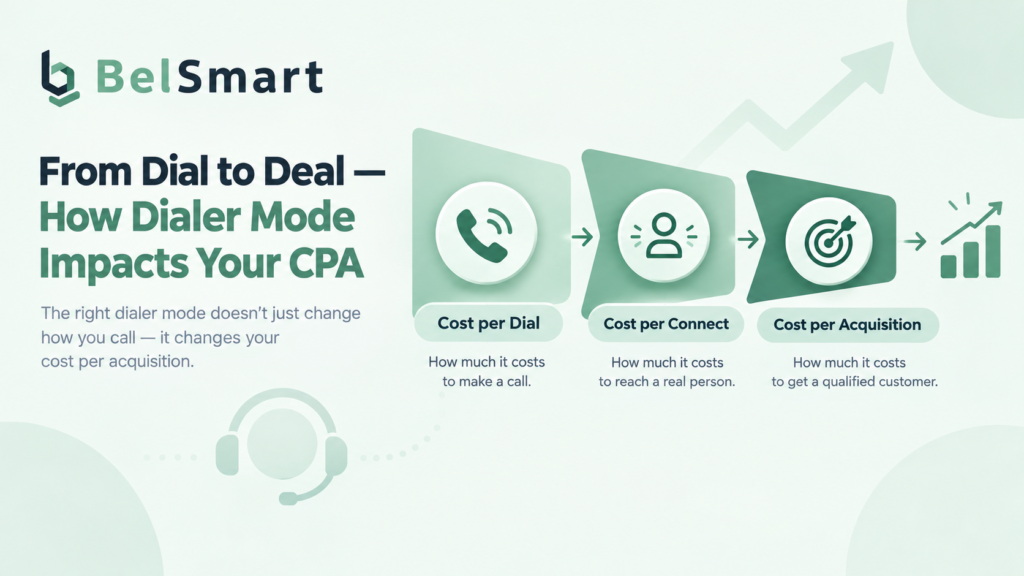
There is no single dialer mode with the lowest CPA in every scenario — the right mode depends on deal complexity, compliance exposure, and call volume. As a general pattern, manual and preview dialers protect call quality at a higher cost per connect, while power and parallel dialers lower cost per connect by cutting idle time, at the cost of some agent context per call.
| Dialer Mode | Cost per Dial | Cost per Connect | Agent Idle Time | Best-Fit Use Case | Typical CPA Impact |
|---|---|---|---|---|---|
| Manual Dialer | Low | Highest | High (agent dials manually) | High-value B2B, compliance-sensitive calls | Higher CPA per call, but lower risk of a bad or non-compliant connection |
| Preview Dialer | Low | High | Moderate (agent reviews lead first) | Insurance, financial services, consultative selling | Higher CPA than automated modes, offset by stronger per-call conversion |
| Power Dialer | Moderate | Lower | Low (auto-advances between calls) | SDR teams, high-volume outbound, lead gen agencies | Meaningfully lower CPA by cutting idle time between dials |
| Parallel Dialer | Moderate–High | Lowest | Very low (multiple lines per agent) | BPO call centers, large-list dialing, high-volume campaigns | Lowest cost per connect at scale, if abandonment stays within compliant limits |

A power dialer removes the gap between calls by automatically advancing to the next lead the moment an agent is free, which is where most of its CPA improvement comes from — not from any single feature, but from the cumulative minutes it puts back into an agent’s day. A parallel dialer goes further, dialing multiple numbers per agent simultaneously so the agent only ever picks up an already-answered call, which is why it typically produces the lowest cost per connect of the four modes, provided abandonment rates are kept within TCPA limits.
Takeaway: the lowest cost per connect isn’t automatically the lowest overall CPA — deal value and compliance risk both belong in the decision, not just dial speed.
What Hidden Costs Push CPA Up Besides the Dialer Itself?
Beyond dialer mode, three hidden costs quietly inflate CPA: spam-flagged caller IDs suppressing connect rates, manual call logging eating agent time, and compliance failures resulting in fines or blocked campaigns. None of these show up as a line item labeled “CPA,” but all three move the number.
Caller ID reputation. A phone number flagged as spam by a carrier’s call-analytics system stops getting answered, no matter how good the dialer or the script is. That single change can silently cut a campaign’s connect rate, which raises CPA without any change to labor cost or lead quality. Our guide on what happens when a caller ID gets flagged as spam breaks down how this happens and how to prevent it.
Manual disposition and data entry. Every minute an agent spends manually logging a call outcome into a CRM instead of dialing the next lead is a minute added to the cost side of the CPA formula with no acquisition attached. Automatic CRM integration that syncs calls and dispositions in real time removes that admin drag entirely.
Compliance risk. Cost-modeling guidance for outbound programs consistently recommends tracking cost per contact, cost per qualified lead, and cost per acquisition together rather than in isolation, since a strong number on one metric can mask a weak one elsewhere. A single TCPA violation — an uncleaned Do Not Call number, an unlogged consent record — can turn a program with an attractive CPA on paper into one with real financial and legal exposure. Regular DNC list scrubbing keeps that risk off the books before it becomes a cost at all.
Takeaway: a dialer with a fast connect rate can still produce a high CPA if caller ID health, CRM logging, and compliance hygiene aren’t managed alongside it.
A Decision Framework: Choosing a Dialer Mode Against a CPA Target
Use the following steps to match dialer mode to your actual cost and compliance profile, rather than defaulting to whichever mode a vendor pitches hardest.
- Calculate your current CPA baseline. Add total campaign cost (labor, software, data) and divide by acquisitions from the last full quarter. Without this number, any dialer switch is a guess.
- Check your connect rate against the 8–20% industry band. If you’re below 10%, idle time and list quality are likely bigger CPA drivers than the dialer mode itself.
- Weigh deal complexity against dial volume. High-value, consultative deals (insurance, financial services, enterprise B2B) usually justify the higher cost-per-connect of a manual or preview dialer, because a lost sale costs far more than a slower dial rate.
- Weigh volume campaigns toward power or parallel dialing. If the goal is maximum live connects across a large list, a power dialer’s auto-advance or a parallel dialer’s multi-line dialing will typically lower CPA faster than adding headcount.
- Audit caller ID health and compliance controls before switching dialers. A faster dialer connected to flagged numbers or an unscrubbed list will not lower CPA — it will just generate more non-compliant or unanswered dials, faster.
- Re-measure CPA 30–60 days after any change. Dialer mode is one input among several; confirm the change actually moved the number before scaling it further.
Takeaway: the right dialer mode is the one that removes cost from your specific CPA formula — idle time, poor connect rates, or compliance exposure — without adding a cost you didn’t have before.
Bringing It Together
Cost per acquisition in outbound sales is driven less by any single feature and more by how much of your paid agent time turns into an actual conversation. Manual and preview dialers protect quality on complex, high-value calls at a higher cost per connect. Power and parallel dialers lower cost per connect at scale by closing the gap between dials. Layered on top of all four, caller ID health, CRM automation, and compliance hygiene decide whether those savings actually reach the bottom line — or get quietly erased by flagged numbers and fines.
Teams evaluating a dialer switch should model CPA against their own connect-rate and deal-value numbers, not a vendor’s headline claim, before committing.
Want to See How Your CPA Would Change?
Compare Belsmart’s dialing modes and CRM sync against your current cost-per-connect numbers.
Frequently Asked Questions
What is a good cost per acquisition for outbound sales?
There is no universal “good” CPA — it depends on deal value and industry. As a general guardrail, cost-modeling research suggests keeping acquisition cost below roughly 30% of customer lifetime value, with strong outbound programs maintaining LTV-to-CAC ratios of 3:1 or higher.
How do I calculate cost per acquisition for a dialer campaign?
Add total campaign cost — agent labor, telephony and software fees, and lead data costs — for a set period, then divide by the number of new customers or qualified conversions in that same period. Recalculate after any dialer or list change to see the real impact.
Does switching from a power dialer to a parallel dialer always lower CPA?
Not always. Parallel dialers typically produce the lowest cost per connect at high volume, but they carry more abandonment and compliance risk if not configured within TCPA limits. For lower-volume, high-value calls, a power or preview dialer can produce a better CPA once deal size is factored in.
Can a dialer fix a high cost per acquisition on its own?
No. Dialer mode affects idle time and connect rate, but list quality, script effectiveness, and caller ID reputation all affect CPA independently. A faster dialer connected to a poor list or flagged numbers will not lower acquisition cost.
What role does caller ID reputation play in cost per acquisition?
A caller ID flagged as spam by carrier call-analytics systems gets answered far less often, which lowers connect rate and raises CPA without any change in labor cost. Maintaining caller ID health is one of the least visible but most direct levers on acquisition cost.
How often should outbound teams re-measure CPA after a dialer change?
Most teams should re-measure CPA 30 to 60 days after a dialer switch or reconfiguration. That window is typically enough to see whether connect-rate or idle-time improvements are translating into lower cost per acquisition, without reacting to short-term noise.
Lower Your Cost Per Acquisition
Book a personalised demo of Belsmart’s Manual, Preview, Power, and Parallel dialing modes — with built-in CRM sync and TCPA compliance — and get a custom plan recommendation in under 30 minutes.
Questions about pricing? sales@belsmart.io · We reply within one business day.