The Ultimate Guide to Outbound Dialer Software: Everything Sales Teams Need to Know in 2026
What is outbound dialer software?
Outbound dialer software is a cloud-based tool that automatically places phone calls from a contact list on behalf of a sales agent or call center team. It eliminates manual dialing, filters voicemails intelligently, and connects agents only to live answered calls — maximizing productive talk time and driving more revenue from every outbound campaign.
Key Outbound Dialer Software Statistics for 2026
- Sales reps using manual dialing spend only 27% of their day in live conversations (industry average)
- Outbound dialer software increases productive talk time to 40–60% of the working day (Belsmart platform data, 2024–2025)
- The global contact center software market will reach $77.82 billion in 2026, growing at 16.50% CAGR
- TCPA violations carry fines of $500–$1,500 per call — and over 2,700 cases were filed in the US in 2024
- Local presence dialing increases outbound call answer rates by 30–40% (Belsmart platform data)
- AI answering machine detection reduces voicemail handling time from 4–5 seconds to under 2 seconds (Belsmart AMD)
- Belsmart customers report 45% more live connects, 60% more talk time, 35% fewer dropped calls, 30% higher conversion rates
Most outbound sales reps spend less than 27% of their working day in actual live conversations. The remaining 73% disappears into manual dialing, voicemail navigation, idle time between calls, and post-call admin work. For a team of ten agents, that wasted time costs thousands of dollars in salary every single week — paid for work a software platform should be handling automatically.
Outbound dialer software solves that problem directly. However, not all dialers work the same way. Choosing the wrong dialing mode for your campaign type, or buying a platform without built-in TCPA compliance, can cost your team more than it saves — in both productivity and legal exposure.
This guide covers everything a sales manager, SDR lead, or call center operator needs to evaluate and choose outbound dialer software confidently in 2026. You will learn exactly what outbound dialer software is, how the four dialing modes differ and which fits your team, the eight features that separate high-performance platforms from tools that break under real campaign load, which industries rely on outbound dialing most, and a seven-step decision framework that covers every evaluation criterion your team needs before signing a contract.
1. What Is Outbound Dialer Software?
Direct Answer
Outbound dialer software is a cloud-based calling platform that automates the process of placing outgoing phone calls from a predefined contact list. Instead of a sales agent manually dialing each number, the software dials automatically, screens for voicemails and disconnected numbers, enforces compliance rules, and connects the agent only when a live person answers.
The core function of outbound dialer software is to eliminate the unproductive time that sits between one live conversation and the next. With manual dialing, an agent dials a number, waits for it to ring, navigates a voicemail greeting, leaves a message, logs the call, then manually dials the next contact. That full cycle takes two to four minutes per attempt. A power dialer compresses it to seconds.
Outbound dialer software operates differently from inbound call center software in one fundamental way: the platform initiates contact rather than receiving it. This distinction drives everything about which features matter most. Dialing modes, list management, answering machine detection accuracy, compliance enforcement, and CRM sync all become primary requirements. Queue routing and IVR trees become secondary.
How Outbound Dialer Software Works: The 7-Stage Workflow
Understanding the workflow behind outbound dialer software helps sales teams configure campaigns correctly and set realistic performance expectations.
- Lead list import — Contact data is pulled from a CRM like HubSpot or Salesforce, or uploaded as a CSV. The dialer applies DNC scrubbing, timezone filtering, and lead scoring rules before any dial is placed.
- Campaign configuration — The manager sets the dialing mode (manual, preview, power, or parallel), call pacing rules, calling hours, voicemail drop recordings, and disposition categories.
- Automated dialing begins — The system dials numbers from the queue according to the configured rules. No agent touches a keypad.
- AI call screening — Within two to three seconds of a call being answered, the system’s AI determines whether a live human or a voicemail recording has picked up. Voicemails trigger an automatic drop. Live connections route to an available agent.
- Live call connection — The agent connects instantly. A screen pop displays the contact’s full CRM profile — name, company, call history, notes, and campaign context — so the agent is prepared from the first word.
- Disposition and sync — After the call ends, the agent logs a disposition with one click. The call recording, transcript, outcome, and notes sync automatically to the CRM contact record.
- Analytics and optimization — Real-time supervisor dashboards show connect rates, talk time, dial rates, and agent performance. Campaign managers use this data to adjust pacing, retry logic, and list prioritization.
Outbound Dialer Software vs. Manual Dialing: The Productivity Gap
| Metric | Manual Dialing | Outbound Dialer Software |
|---|---|---|
| Daily calls per agent | 40–80 | 80–300+ (mode-dependent) |
| Productive talk time | 20–27% of workday | 40–60% of workday |
| Time lost to voicemails | 30–60 sec per voicemail | Under 2 seconds (AI AMD) |
| CRM data entry | Manual — prone to gaps | Automatic — 100% logged |
| TCPA compliance enforcement | Manual — error-prone | Automated and enforced by platform |
| Setup time | None | Under 1 hour (Belsmart) |
Why 2026 Is a Critical Year for Outbound Dialer Software
The FCC’s one-to-one consent rule, which took full effect in January 2024, fundamentally changed the compliance environment for outbound calling in the United States. Under this rule — enforced by FCC regulations — businesses must obtain individual, specific written consent from each consumer before placing automated outbound calls to that consumer’s phone number. A single blanket consent no longer covers multiple companies or campaign types.
For sales teams still using legacy dialers built before this regulatory shift, the compliance gap is real and expensive. TCPA violations carry fines of $500 to $1,500 per call, and with over 2,700 TCPA cases filed in the US in 2024, enforcement is active and well-funded. Outbound dialer software built with compliance at its architectural core — not added as a paid bolt-on — is the only category of tool that adequately addresses this environment.
2. What Are the 4 Types of Outbound Dialer Software?
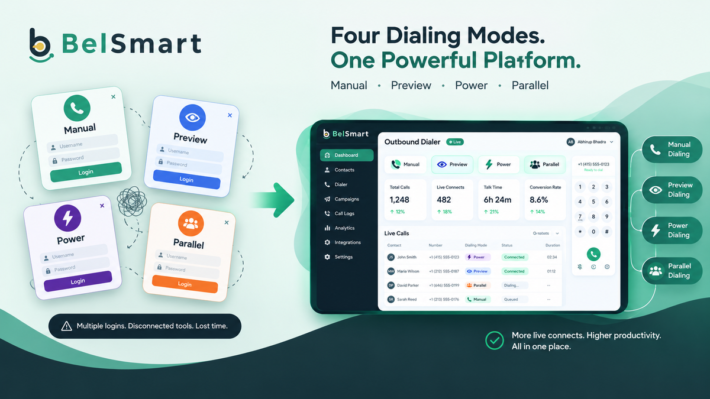
There are four main types of outbound dialer software: manual dialer, preview dialer, power dialer, and parallel dialer. Each type offers a different balance of call volume, agent control, and TCPA compliance risk. The right choice depends on your team’s sales motion, campaign type, and regulatory requirements.
Type 1: Manual Dialer (Click-to-Call)
A manual dialer is outbound dialer software that requires the agent to initiate each call by clicking a button next to a contact record. The agent controls the pace entirely — no call is placed until the agent is ready.
Manual dialers eliminate the risk of TCPA abandoned calls entirely because a live agent is always present before any number is dialed. They work best when conversation quality matters more than call volume — when each prospect deserves individual preparation and the agent needs full CRM context before saying a word.
- Best for: High-value B2B outreach, compliance-sensitive financial services calls, warm follow-ups on prior conversations, and healthcare outreach where regulatory scrutiny is highest.
- Call volume: 40–80 attempts per agent per day.
- TCPA risk level: Lowest — agent initiates every call.
Type 2: Preview Dialer
A preview dialer automatically presents the agent with the contact’s full CRM profile — name, company, call history, notes, and campaign context — before the call is placed. The agent reviews this information during a configurable preview window, then the call dials automatically or on the agent’s command.
Preview dialers increase conversion rates by enabling personalized, context-aware conversations from the first sentence. The agent who has reviewed the contact’s prior quote, previous interactions, and household details before the call fires is a fundamentally different conversation partner than one who dials blind. That preparation difference shows up in close rates.
- Best for: Insurance outreach, financial services re-engagement, re-engagement campaigns, and any scenario where individual prospect context directly impacts the opening of the conversation.
- Call volume: 60–100 attempts per agent per day.
- TCPA risk level: Low — agent reviews before call fires.
Type 3: Power Dialer
A power dialer automatically dials the next contact on an agent’s list the moment their previous call ends. The 1:1 ratio — one call per agent at a time — guarantees the agent is always available when a prospect answers, eliminating abandoned call risk entirely.
Power dialers are the most popular dialing mode for mid-market B2B sales teams because they deliver a significant increase in call volume without any increase in compliance risk. According to Belsmart platform data from 2024–2025, teams switching from manual dialing to a power dialer see 80 to 150 daily dials per agent — compared to 40 to 80 with manual dialing — while maintaining a 100% live-agent-on-every-call standard.
- Best for: SDR teams, inside sales organizations, lead generation agencies, and any team running structured outbound prospecting on warm or semi-warm contact lists.
- Call volume: 80–150 attempts per agent per day.
- TCPA risk level: Very low — 1:1 ratio eliminates abandoned calls.
Type 4: Parallel Dialer
A parallel dialer calls multiple phone numbers simultaneously for a single agent — typically two to ten lines at once. When a live person answers, the system immediately connects that call to the agent and drops the remaining outgoing lines.
Parallel dialers produce three to five times more live connections per hour than single-line dialing. The tradeoff is compliance complexity. Under FCC regulations, any call that connects to a live person without an available agent constitutes an abandoned call — and the FCC requires that no more than 3% of answered calls per 30-day rolling period be abandoned. Properly configured parallel dialer software enforces this limit automatically through built-in pacing controls.
- Best for: BPO call centers, solar and home services teams dialing purchased lists at scale, high-volume insurance lead generation, and political campaign outreach.
- Call volume: 150–300+ attempts per agent per day.
- TCPA risk level: Moderate — managed by built-in abandoned call rate controls.
3. Outbound Dialer Type Comparison Table
| Dialer Type | Daily Calls / Agent | Agent Control | TCPA Risk | Best Use Case | Compliance Level |
|---|---|---|---|---|---|
| Manual Dialer | 40–80 | Full — agent initiates | Lowest | High-value B2B, healthcare, finance | Highest |
| Preview Dialer | 60–100 | High — reviews before dial | Low | Insurance, financial services, re-engagement | High |
| Power Dialer | 80–150 | Moderate — auto-advances | Very Low | SDR teams, inside sales, lead gen | Very High |
| Parallel Dialer | 150–300+ | Lower — multi-line | Moderate | BPO, solar, high-volume lists | Managed |
4. 8 Key Features to Look for in Outbound Dialer Software in 2026
The dialing mode is the foundation. The features built around it determine whether a platform performs at scale — or breaks down when campaign volume increases. These are the eight features that separate enterprise-grade outbound dialer software from tools that look capable in a demo but fail in production.
Feature 1
AI Answering Machine Detection (AMD)
What it is
AI Answering Machine Detection (AMD) is a real-time audio analysis system that determines whether an answered call has connected to a live human or a voicemail recording — and makes that determination in milliseconds before connecting the agent.
The speed and accuracy of AMD directly determines how much of an agent’s shift is spent in productive conversation. Slow detection — four to five seconds per call — wastes significant time across hundreds of daily dials. Inaccurate detection creates a worse problem: a false positive drops a live prospect before the agent can speak, creating both a lost opportunity and a potential compliance issue.
Belsmart’s AI-powered AMD detects voicemails in under two seconds — significantly faster than rule-based detection systems. When AMD identifies a machine, it automatically triggers a pre-recorded voicemail drop, so the agent advances immediately to the next dial without waiting through the greeting. Over 200 daily dials per agent, a three-second speed advantage in AMD translates to ten additional minutes of recaptured talk time per shift.
Feature 2
Local Presence Dialing
What it is
Local presence dialing automatically displays a phone number with a local area code matching the geographic location of each prospect being called.
A prospect in Houston sees a Houston area code. A prospect in Chicago sees a Chicago number. According to Belsmart platform data, local presence dialing increases outbound call answer rates by 30 to 40 percent compared to calling from an out-of-state number or toll-free line. On cold outbound campaigns where base answer rates often sit below ten percent, a 30 to 40 percent improvement is one of the highest-ROI configuration changes a team can make at zero additional cost per call.
Feature 3
Two-Way CRM Integration
What it is
CRM integration connects the dialer bidirectionally to a customer relationship management platform, so every call outcome, disposition, recording, and note syncs automatically to the contact record — and updated CRM data flows back to the dialer in real time.
One-way integration pushes call data to the CRM. Two-way integration means the CRM also sends updated lead data, new contacts, and deal stage changes back to the dialer in real time — so agents always dial from current information, not a stale export from three days ago.
Belsmart integrates natively with HubSpot, Salesforce, Zoho CRM, Pipedrive, Freshsales, LeadSquared, and Bitrix24 — all with full two-way sync. Every call, disposition, recording, and note posts to the CRM contact record automatically.
Feature 4
Built-In TCPA Compliance Tools
What it is
TCPA compliance tools are platform-level controls that automatically enforce the Telephone Consumer Protection Act requirements for every outbound campaign — including DNC scrubbing, abandoned call rate limits, consent logging, and timezone-based call restrictions.
TCPA — the Telephone Consumer Protection Act — is the US federal law governing outbound calling. Violations carry fines of $500 to $1,500 per call. With over 2,700 TCPA cases filed in the US in 2024 alone, compliance is an active enforcement priority, not a theoretical risk. The four compliance tools every outbound dialer platform must include are:
- Automatic DNC list scrubbing — removes contacts on the national and state-level Do Not Call registries before any campaign launches
- Abandoned call rate controls — enforces the FCC’s 3% abandoned call limit per 30-day rolling period automatically
- Consent logging — documents and stores specific consent records for each contact in a retrievable format for audit purposes
- Timezone-based call restrictions — automatically prevents dialing outside legally permitted hours in each prospect’s local timezone
Belsmart includes all four compliance tools on every plan, built into the platform architecture — not sold as add-ons.
Feature 5
Call Recording and Transcription
What it is
Call recording captures 100% of outbound calls to cloud storage. Transcription converts recordings into searchable text, allowing managers to locate specific calls by keyword without manually reviewing audio files.
In regulated industries — insurance, financial services, healthcare — call recording is a legal requirement, not a preference. The ability to produce a specific call recording for a compliance request within minutes is a capability lightweight dialer tools cannot match at scale. Belsmart records 100% of calls, stores them securely in the cloud, and provides keyword-searchable transcripts for QA, coaching, and compliance review.
Feature 6
Real-Time Supervisor Dashboards
What it is
Real-time supervisor dashboards display live agent status, dial rate, connect rate, talk time, and campaign performance metrics — updated in real time, not on a 24-hour reporting lag.
Beyond passive monitoring, high-performance dialer platforms offer three live call coaching modes. Barge mode allows the supervisor to join a live call without the prospect’s knowledge for immediate intervention. Whisper mode lets the supervisor speak only to the agent without the prospect hearing. Listen mode enables silent quality assurance monitoring. These tools are particularly valuable for onboarding new hires and coaching underperforming agents without disrupting live calls.
Feature 7
Smart Lead Recycling
What it is
Smart lead recycling automatically re-queues unanswered contacts based on configurable rules — including best time of day, minimum retry interval, maximum attempt count, and prior disposition type.
Without smart lead recycling, unanswered leads fall through the cracks — buried in a list, never retried at the optimal time, and eventually abandoned as stale. A properly configured recycling system ensures that no qualified prospect is lost because of poor timing. Belsmart’s smart lead recycling auto-queues missed contacts by time of day, attempt count, and disposition type, so every viable lead gets a second chance at the right moment.
Feature 8
Voicemail Drop
What it is
Voicemail drop allows a pre-recorded message to be left automatically when AMD detects a voicemail, without the agent waiting through the greeting — freeing the agent to advance immediately to the next dial.
A well-crafted voicemail drop keeps a consistent, professional brand voice across every unanswered call. It also saves agents 30 to 60 seconds per voicemail. Across 50 voicemails per day, that recaptured time adds up to 25 to 50 minutes of additional productive time per agent per shift — which compounds meaningfully across a full team and a full quarter.
5. Which Industries Use Outbound Dialer Software the Most?
The industries that use outbound dialer software most heavily in the United States are insurance, real estate, financial services, solar, home services, BPO call centers, and lead generation agencies. These sectors share three common requirements: high outbound call volume, measurable ROI from improved connect rates, and strict TCPA compliance obligations.
| Industry | Primary Dialer Mode | Key Use Case | Top Compliance Concern |
|---|---|---|---|
| Real Estate | Power Dialer | Seller prospecting, buyer follow-up | DNC scrubbing, local calling hours |
| Insurance | Preview Dialer | Policy renewal, new product outreach | TCPA consent, state DNC lists |
| Financial Services | Preview / Power | Mortgage follow-up, refinance outreach | TCPA consent, CFPB regulations |
| BPO / Call Centers | Parallel Dialer | Multi-client outbound campaigns | Abandoned call rate, multi-client consent |
| Solar / Home Services | Parallel Dialer | Homeowner list dialing | FCC one-to-one consent rule |
| IT Services / SaaS | Power Dialer | SDR prospecting, outbound cold calling | DNC scrubbing, calling hours |
| Lead Generation | Parallel / Power | List penetration, appointment setting | Consent logging, DNC compliance |
6. How to Choose the Right Outbound Dialer Software in 2026: A 7-Step Framework
To choose the right outbound dialer software, evaluate these 7 criteria in order: (1) dialing mode fit, (2) built-in TCPA compliance, (3) two-way CRM integration, (4) AI AMD accuracy and speed, (5) setup time and onboarding support, (6) pricing transparency, and (7) scalability. Any platform that fails two or more of these checks is the wrong choice for a US-based outbound sales team.
Most sales teams waste weeks evaluating outbound dialers on feature lists and pricing pages without asking the questions that actually determine fit. These seven steps cut through the noise.
Match the Dialing Mode to Your Sales Motion
Before comparing any platforms, identify which dialing mode your team’s campaigns actually require. High-value B2B sales with long sales cycles need a manual or preview dialer — context and preparation matter more than speed. High-volume cold outbound on large contact lists needs a power or parallel dialer — connection velocity is the primary KPI. If your team runs multiple campaign types simultaneously, you need a platform that offers all four modes on a single system, so agents switch modes without switching tools.
Verify TCPA Compliance Is Architectural — Not a Bolt-On
There is a meaningful difference between a platform that mentions TCPA in its marketing copy and one that enforces compliance at the infrastructure level. Ask vendors directly: Is DNC scrubbing automated before every campaign launch? Are abandoned call rate limits enforced by the platform? Is consent logging built into the system? Is timezone restriction automatic? If any answer requires a third-party integration or manual configuration, the compliance toolset is not truly built in — and your legal exposure is real.
Confirm CRM Integration Is Two-Way and Automatic
Request a live demo showing a completed call, a logged disposition, and the updated contact record in your specific CRM appearing in real time. One-way integrations that require manual syncs or nightly batch imports are insufficient for teams running high-volume campaigns where data accuracy determines the next day’s dial list. Ask specifically whether your CRM is natively supported or requires a Zapier intermediary.
Evaluate AI AMD Accuracy and Detection Speed
Ask for specific AMD performance metrics — not estimates. What is the average detection time? What is the false positive rate — live humans incorrectly identified as voicemails and dropped? How does detection accuracy hold up on conversational voicemail greetings that sound like a real person answering? A false positive drops a live prospect before the agent can speak — a compliance risk and a lost conversion in the same moment. Belsmart’s AI AMD detects voicemails in under two seconds with a high accuracy rate across real-world call conditions.
Check Setup Time and Onboarding Support Quality
An enterprise platform with a six-to-twelve week implementation timeline is the wrong tool for a mid-market team that needs to run a campaign this week. Ask vendors for their median time from contract signature to first live call. Ask whether the platform requires IT resources, hardware installation, or specialized configuration. The best platforms are entirely browser-based, require no downloads, and are genuinely live in under one hour. Belsmart is browser-based, hardware-free, and gets most teams to their first live call within the same session they sign up.
Review Pricing Transparency
Ask for a written breakdown of every cost component before signing: platform fee, per-minute calling rates, compliance add-on costs, CRM integration fees, call recording storage, and support tier pricing. If a vendor cannot provide a complete total cost of ownership in writing before contract, that is a meaningful signal about how they operate after you sign. Belsmart publishes transparent pricing with no hidden fees — every cost component is consistent across team sizes.
Confirm Scalability From Current Team to 3x Growth
The platform that works for ten agents needs to work equally well for thirty agents in eighteen months. Ask specifically about per-seat pricing at two and three times your current headcount, architectural limits on concurrent calls or campaign volume, and whether enterprise features like multi-tenant campaign management and white-label capabilities are available on your plan or locked behind a higher tier.
Ready to evaluate a platform that meets every one of these seven criteria?
Belsmart gives your team all four dialing modes on one platform, built-in TCPA compliance on every plan, native CRM sync with HubSpot and Salesforce, AI AMD under 2 seconds, and full setup in under one hour — with no hardware, no downloads, and transparent pricing with no hidden fees. Book a free demo and see every dialing mode, every compliance feature, and every CRM integration working live in thirty minutes.
7. How Belsmart Outbound Dialer Software Works
Belsmart is a cloud-based outbound dialer software platform built by Beltalk Solutions LLC, headquartered at 433 Central Ave, 4th Floor, St. Petersburg, Florida. Belsmart was designed specifically for sales teams and call centers running between one and one thousand-plus agents — the mid-market segment that enterprise platforms price out and lightweight tools cannot adequately serve.
All 4 Dialing Modes on One Unified Platform
Belsmart is the only mid-market outbound dialer platform that offers all four dialing modes — manual dialer, preview dialer, power dialer, and parallel dialer — on a single unified system. Sales teams switch between dialing modes as campaign needs change, without switching tools, renegotiating contracts, or retraining agents on a different interface. A team can run a high-touch B2B preview dialer campaign in the morning and a high-volume parallel dialer list campaign in the afternoon, from the same platform and the same agent dashboard.
Performance Results From Belsmart Customers
| Metric | Result | Source |
|---|---|---|
| More live connects per agent | +45% | Belsmart platform data, 2024–2025 |
| More productive talk time per day | +60% | Belsmart platform data, 2024–2025 |
| Fewer dropped calls | –35% | Belsmart platform data, 2024–2025 |
| Higher conversion rate | +30% | Belsmart platform data, 2024–2025 |
| Platform uptime SLA | 99.99% | Belsmart SLA guarantee |
| Average setup time | Under 1 hour | Belsmart onboarding data |
| AI AMD detection speed | Under 2 seconds | Belsmart AMD benchmark |
| Local presence answer rate lift | +30–40% | Belsmart platform data |
Built-In TCPA Compliance — Architecture-Level, Not a Feature Toggle
Unlike platforms that sell compliance as a paid add-on, Belsmart’s TCPA compliance toolset is included on every plan at every team size. Automatic DNC scrubbing runs before every campaign launch. Abandoned call rate controls enforce the FCC’s 3% limit automatically. Consent logging documents specific consent for each contact in a retrievable format. Timezone-based call restrictions prevent agents from dialing outside permitted hours. All four tools are enforced by the platform — not left to campaign managers to remember.
CRM Integrations That Actually Sync Both Ways
Belsmart integrates natively with HubSpot, Salesforce, Zoho CRM, Pipedrive, Freshsales, LeadSquared, and Bitrix24 — with full two-way sync on every supported platform. Every call, disposition, recording, and note posts to the CRM contact record automatically after each call. Belsmart also supports Zapier, Google Sheets, REST API, and Webhooks for teams with custom or non-standard CRM configurations.
No Hardware. No Downloads. Live in Under One Hour.
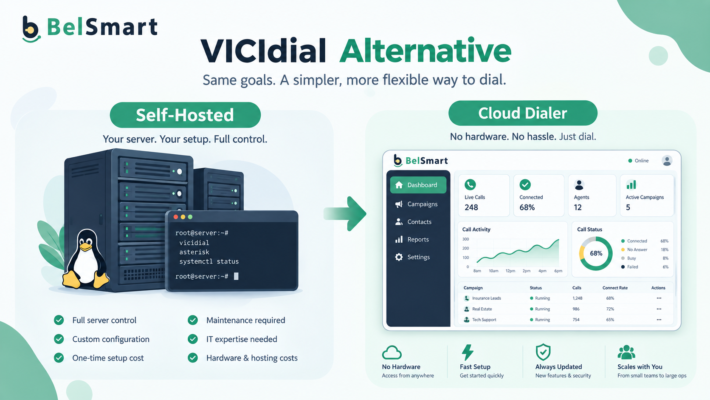
Belsmart is entirely browser-based. There is no hardware to install, no software to download, and no IT team required. Most sales teams connect their CRM, upload their contact list, configure their campaign settings, and place their first live call within the same hour they sign up. Belsmart provides end-to-end support from initial configuration through first campaign launch — at no additional cost.
Belsmart serves sales teams and call centers across real estate, insurance, financial services, BPO, IT services, home services, solar, and lead generation.
Contact the Belsmart team at +1 (727) 284-6052 or admin@belsmart.io
Frequently Asked Questions
What is outbound dialer software?
Outbound dialer software is a cloud-based platform that automatically places outgoing phone calls from a contact list on behalf of a sales agent or call center team. It eliminates manual dialing, uses AI to detect and skip voicemails, enforces TCPA compliance automatically, and connects agents only to live answered calls — increasing productive talk time from 27% to 40–60% of the working day.
What is the difference between a power dialer and a parallel dialer?
A power dialer calls one number per agent at a time, advancing automatically when each call ends. The 1:1 ratio guarantees agent availability on every connection and eliminates abandoned call risk. A parallel dialer calls two to ten numbers simultaneously per agent, connecting the agent only when a live person answers. Parallel dialers produce three to five times more live connections per hour but require built-in abandoned call rate controls to remain TCPA compliant.
Is outbound dialer software TCPA compliant?
Not all outbound dialer software is TCPA compliant. Compliance depends on whether the platform includes automated DNC scrubbing, abandoned call rate enforcement, consent logging, and timezone-based call restrictions — and whether these tools are enforced architecturally or left to manual configuration. Belsmart includes all four TCPA compliance tools on every plan as a core platform feature, not a paid add-on.
How does AI answering machine detection work?
AI answering machine detection (AMD) analyzes the audio of an answered call in real time to determine whether a live human or a voicemail recording has picked up. Machine learning models trained on large datasets of real call audio distinguish between live speech and recorded greetings — including conversational voicemails that sound like a real person. Belsmart’s AI AMD makes this determination in under two seconds per call.
What CRM systems integrate with outbound dialer software?
Leading outbound dialer platforms integrate natively with HubSpot, Salesforce, Zoho CRM, Pipedrive, Freshsales, LeadSquared, and Bitrix24. Belsmart supports all of these integrations with full two-way sync, plus Zapier, Google Sheets, REST API, and Webhooks for custom configurations. Every call, disposition, recording, and note syncs to the CRM contact record automatically after each call — with zero manual data entry required.
How many calls can a sales rep make per day with a power dialer?
With manual dialing, a sales rep completes 40–80 attempted calls per day, spending roughly 20–27% of the workday in live conversation. With a power dialer, the same rep completes 80–150 daily attempts, with productive talk time increasing to 40–60% of the working day, according to Belsmart platform data from 2024–2025. A parallel dialer can push daily attempts to 150–300+ per agent depending on list answer rates.
How long does it take to set up outbound dialer software?
Setup time varies significantly by platform. Enterprise platforms typically require six to twelve weeks of implementation. Belsmart is designed for same-day deployment — teams connect their CRM, upload their contact list, configure campaign settings, and place their first live call in under one hour, with no hardware, no downloads, and no IT team required. Most Belsmart customers are live on the day they sign up.
What industries use outbound dialer software the most in the US?
The highest-volume users of outbound dialer software in the United States are insurance agencies, real estate firms, financial services companies, solar installers, home services providers, BPO call centers, and lead generation agencies. These industries share common requirements: high outbound call volume, strong ROI from improved connect rates, and strict TCPA compliance obligations that make built-in compliance tools a purchasing requirement.
What is local presence dialing?
Local presence dialing is a feature in outbound dialer software that automatically displays a phone number with a local area code matching the geographic location of each prospect. Research and Belsmart platform data consistently show that local presence dialing increases outbound call answer rates by 30–40% compared to calling from an out-of-state or toll-free number. Belsmart rotates caller ID automatically based on each prospect’s location.
What is the FCC one-to-one consent rule and how does it affect outbound calling in 2026?
The FCC’s one-to-one consent rule, effective January 2024, requires businesses to obtain individual, specific written consent from each consumer before placing automated outbound calls to their phone number. Prior to this rule, a single consent could cover multiple companies. Under the current rule, each business must hold its own documented consent per contact. This change has made consent logging a non-negotiable requirement for any US outbound sales team using dialer software.
Key Takeaways
Outbound dialer software increases productive talk time from 27% to 40–60% of the working day by eliminating manual dialing, voicemail navigation, and idle time between calls.
There are four types of outbound dialer software — manual, preview, power, and parallel — each suited to a different balance of call volume, agent control, and TCPA compliance risk.
TCPA compliance must be built into the platform architecture — not configured manually or purchased as an add-on — for any US outbound sales team operating in 2026.
The most important evaluation criteria when choosing outbound dialer software are: dialing mode fit, built-in compliance tools, two-way CRM integration, AI AMD speed and accuracy, setup time, pricing transparency, and scalability.
Belsmart offers all four dialing modes on one platform, built-in TCPA compliance on every plan, AI AMD under 2 seconds, native CRM integrations with HubSpot and Salesforce, and same-day setup with no hardware required.
Conclusion
Three things matter most when choosing outbound dialer software in 2026. First, the dialing mode must match your campaign type — no single mode fits every team, and any platform offering only one mode limits what your team can accomplish as campaigns evolve. Second, TCPA compliance must be enforced at the platform architecture level, not configured manually — the FCC’s enforcement environment in 2026 makes this non-negotiable for every US outbound sales team. Third, setup speed and pricing transparency reveal more about a vendor’s operating philosophy than any feature list — a platform that is honest about costs and genuinely live in under one hour was built for customers, not for contract negotiations.
Most outbound dialer software on the market today falls into one of two failure modes: too basic for teams that need to scale, or too complex and expensive for teams that need to move quickly. Belsmart was built specifically for the sales teams and call centers operating between those two extremes — teams of one to one thousand-plus agents who need enterprise-grade performance without enterprise-grade complexity, pricing, or implementation timelines.
Ready to see what the right outbound dialer software looks like for your sales team?
Belsmart is live in under one hour — no hardware, no downloads, no IT team required. Book a free demo and see every dialing mode, every compliance feature, and every CRM integration working live in thirty minutes.